
Print Security

What does secure printing mean?
How secure is cloud printing?
Who can see what was printed on a printer?

Print Security 2

Secure Printing Solutions & Printer Leasing

You need more than antivirus software and network policies to protect sensitive business information. Every document you print, scan, or copy can be viewed and stolen by malicious actors, both internal and external. That’s why you need secure printing solutions.

At Digihub Wales, we can supply you Ricoh multifunction devices with robust built-in security. With PaperCut MF onboarding, you gain complete visibility over your print environment, with user authentication for additional cloud print security, and with end-to-end encryption.

07841 995976

What Does Secure Printing Mean?

Secure printing solutions are software, devices, and procedures designed to protect documents from unauthorised access when printed. With print security, documents can be protected while they are sent to the print queue, sent to printers in secure areas, or prevented from unauthorised printing outright.

Modern workplaces handle sensitive documents every day, from financial records to contracts, HR records, and trade/operational secrets. If sent via unsecured cloud printing, sent to a publicly accessible printer, or allowed to be printed by any member of staff, then that is a security breach waiting to happen.

Print Security 3

Ricoh’s Secure Printing Environment

We can help your business build a bespoke and secure print environment that protects sensitive documents from unauthorised access. With our Ricoh copier/printer leasing or purchasing service, you could benefit from:

Secure authentication

Ensure only authorised employees can print or interact with copier/printer devices using passwords or PIN codes.

End-to-end encryption

Protect documents from interception between the cloud and/or devices.

Centrally managed settings

Manage permissions, updates and security settings across several printers from one place.

Data shredding

Ensure temporary, unsecure information does not remain on printer devices.
07841 995976
Print Security - 1
Print Security - 1

How Secure is Cloud Printing?

With end-to-end encryption protecting documents as they move from the cloud to the printer, cloud print security is quite robust. Endpoint vulnerabilities and access to printers or documents still need to be carefully managed, especially if printing remotely.

Ricoh print security features encryption and access settings that foster cloud-secure printing. Combined with Papercut MF’s print security features, your documents and printing operations will be protected.

PaperCut MF Print Security Features

PaperCut MF is an optional software platform that DigiHub Wales can onboard to provide you with highly advanced print security features. Benefit from user accountability, robust printing controls, and detailed reports on printing activity.

Enhanced Authentication

Utilise NFC cards or multi-factor authentication for additional security.

Secure print release

Staff must authenticate themselves at the printer before it processes the job, preventing confidential documents from being left unattended.

Follow-Me Printing

Print from any authorised device selected at point of authentication, without selecting it beforehand.

Audit logs & reports

Collect comprehensive GDPR-compliant records of who printed, what they printed, where, and when.

Print Archiving

Enhanced administrative reporting of printed documents, including contents.

Enhanced print controls

Fine-tune which staff can use certain copier/print features such as colour print, scan-to-email, out-of-hours printing, and all mentioned PaperCut MF features.

Who Can See What Was Printed on a Printer?

With standard secure printing solutions, admins can track basic file names, page counts, print settings, and user accounts. With PaperCut MF’s Print Archiving feature, administrators can see the content of documents sent to the print queue.


hand-holding-tablet-with-glowing-antivirus-interfa-2026-01-11-08-45-54-utc
Print Security - 3

Security Threats

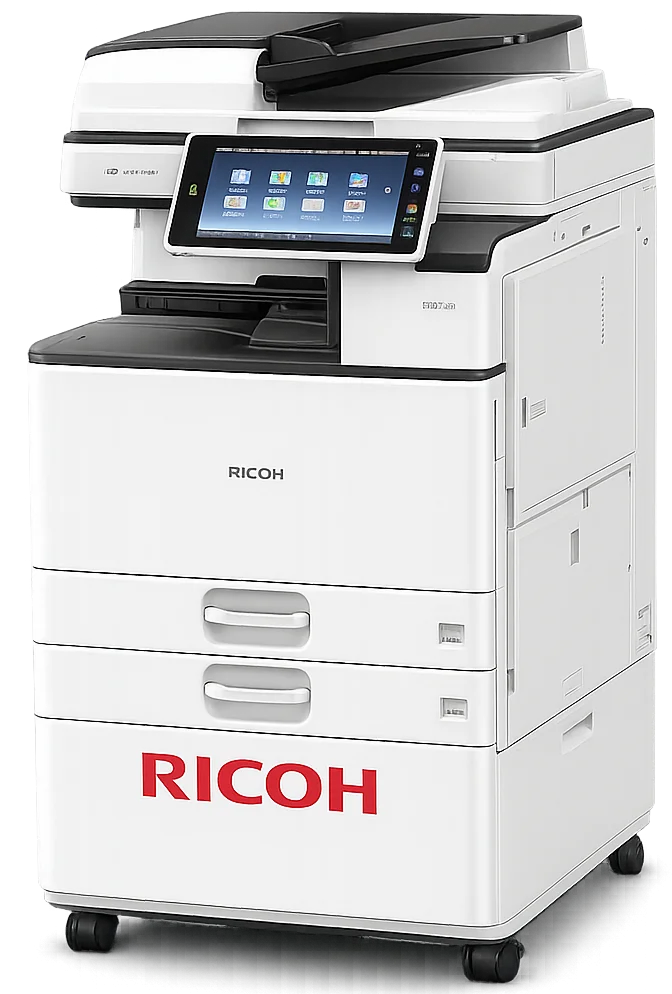
Security threats are no longer limited to personal computers, servers or networks. Printing devices — even basic laser printers — need countermeasures against a diverse range of threats. As multifunction printers have evolved into true information terminals, they have become core IT assets in their own right. The computing capability of what have been traditionally categorized as “Printer/Copiers” has grown, but so too have potential threats.

Print Security - 4
Ricoh Printer
Unsecured firmware and other malware
If a multifucntion printer's or printer’s built-in software — also known as firmware — is altered or compromised, that device can then be used as a method of intrusion into the corporate network, as a means to damage the device or as a platform for other malicious purposes. Ricoh-designed devices are built using a Ricoh-only Trusted Platform Module (TPM) and are designed to not boot up if the firmware has been compromised.
In addition to the firmware, many multifunction printers support the installation of applications which, if allowed to run, could allow an attacker access to the device. To protect against malicious code, Ricoh's multifunction products will only allow an application to be installed if it incldues a valid Ricoh digital signature.
Malicious access via networks
In an increasingly connected modern world, the number of possible points of entry for a malicious attacker also increase. While multifunction printers can be discovered over the network, features such as user authentication and filtering help reduce the risk of information leaks via networks by preventing an intruder from accessing internal features.
Improper access through fax telephone lines
Enabling a device’s fax feature may mean connecting it to the outside via a telephone line — which means that blocking potential unauthorized access via the fax line is critical. Ricoh embedded software is designed to only process appropriate types of data (i.e. fax data) and send that data directly to the proper functions within the device. Because only fax data can be received from the fax line, the potential for unauthorized access from the fax line to the network or to programs inside the device is eliminated.
The tapping and alteration of information over the network
Multifunction printers exchange critical information with computers and servers over networks. If left unprotected, this information is at risk of alteration by those with malicious intent who would tap into the network. Ricoh multifunction printers and technologies offer features that can help protect against unauthorized access via networks.
Unauthorized access via a device’s operation panel
Multifunction printers in an office environment are exposed to security risks of unauthorized access to information via the operator panel. Many cases of information leaks are reportedly committed by insiders. To reduce these risks, Ricoh's multifunction printers include user authentication features so that specific access privileges can be set up for individual users. It is important to properly manage and run devices without letting users access the information and functions they do not need.
Information leaks from HDD storage media
Multifunction printers have a built-in storage device, such as a hard disk drive, for strong information such as address books and documents. The hard disk drive may also contain temporary copies of information scheduled for transmission, reception and printing. Using Ricoh's data encryption and data overwrite features can reduce the risks of information leakage, even if the storage device were physically removed from the device.
Information leaks via hard copy
A document left on the tray of a multifunction printer could be read or taken by anyone. Whether it was taken deliberately or accidentally, this is an information leakage risk. To help protect your information, Ricoh multifunction products include user authentication and locked printing features.
Security policy breaches due to carelessness
Information could be leaked by accidentally sendng a fax to an incorrect address, or making too many copies of a document and leaving them behind. Ricoh's multifunction printers feature functions that can help minimize the risk of information leaks due to carelessness.

Choose Digihub Wales’ Secure Printing Solutions

In addition to our copier/printer leasing and purchasing solutions, we can design a bespoke cloud-secure printing environment tailored to your organisation’s needs. Our team handles installation, configuration, user setup, and ongoing support to ensure you’re up to date and ready to print.

Whether you’re replacing ageing printers, switching managed print service providers, or implementing a fully secure print environment, we can onboard you with Ricoh devices and PaperCut MF to deliver. Talk to Digihub Wales today and discover how we can add protection, accountability, and control to your print infrastructure.


07841 995976
x

Contact With Us!

2220 Plymouth Rd #302, Hopkins, Minnesota(MN), 55305

Call us: (234) 109-6666

Mon – Sat: 8.00am – 18.00pm / Holiday : Closed